Jekyll2026-03-29T13:36:54+02:00https://timnaher.github.io/feed.xmlTim NäherPhD Candidate at the Max Planck Institute for Biological CyberneticsTim Nähertim.naeher@tuebingen.mpg.deGazeAnnot: a desktop app for labeling eye movements and training U’n’Eye2026-03-29T00:00:00+01:002026-03-29T00:00:00+01:00https://timnaher.github.io/posts/2026/03/gazeannotI built a desktop application for labeling eye movement events and training the U’n’Eye deep learning model for automatic saccade detection. It’s called GazeAnnot, and it wraps the full workflow, from raw eye position data to trained model, into a single interactive tool.
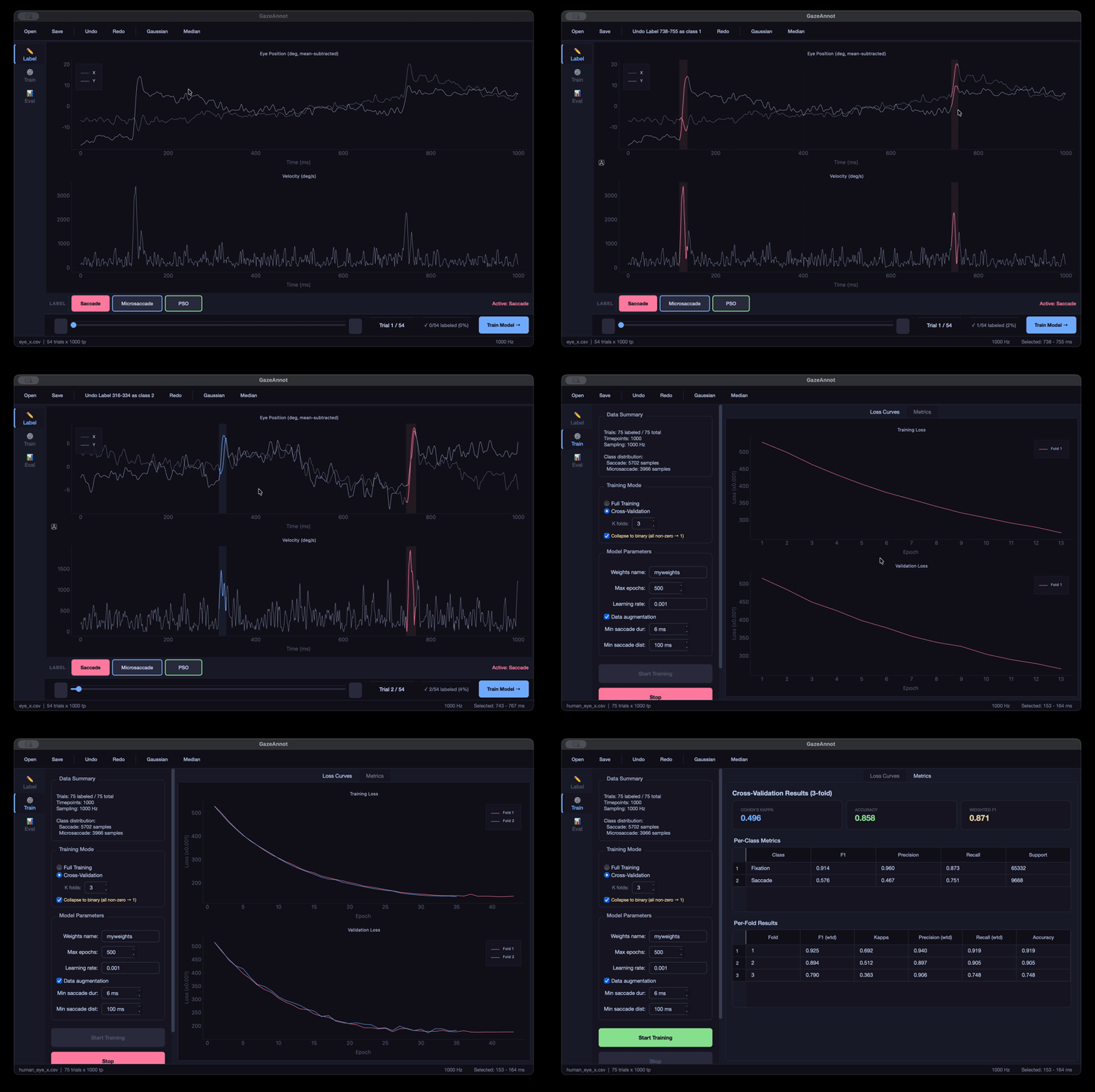
GazeAnnot in action: labeling saccades on eye position and velocity traces, then training U'n'Eye with live loss curves and per-class metrics.
Why this exists
Detecting saccades, microsaccades, and post-saccadic oscillations (PSO) in eye tracking data is a common task in vision research. The classical approach is velocity-threshold algorithms, but these require careful parameter tuning and struggle with noisy data or unusual saccade profiles. U’n’Eye (Bellet et al., 2019) showed that a deep neural network can match human-level saccade detection performance, but using it in practice means you need labeled training data, and labeling eye movement events by hand is tedious without a proper tool.
Existing labeling tools are either too general-purpose (not optimized for time series), require MATLAB, or don’t integrate with the training loop. I wanted something where you can load your data, label events interactively, train a model, evaluate it, and iterate, all without leaving the application.
The three views
GazeAnnot has three views, accessible from a sidebar: Label, Train, and Evaluate.
Label
The labeling interface shows two synchronized plots: eye position (X and Y overlaid, mean-subtracted) on top, and Euclidean velocity in deg/s on the bottom. You label by dragging on the plot to select a time region and pressing Space to apply the active event class.
There are three default event classes, Saccade, Microsaccade, and PSO, each with its own color and keyboard shortcut (1, 2, 3). You can add custom classes with their own names, colors, and shortcuts through the class manager.
A few things that make labeling less painful:
Undo/redo for all label edits (Ctrl+Z / Ctrl+Shift+Z)
Right-click on a labeled segment to change its class
Double-click to erase a segment
Auto-save whenever you navigate between trials
Gaussian smoothing (G) and median filter (M) toggles for noisy data
Auto-detection of Y files and existing label files when you load data
Train
Once you have labeled data, you switch to the Train view. Two training modes are available:
Full training: train on all labeled data and save the weights
K-fold cross-validation (2-20 folds): get honest generalization metrics before committing to a final model
The training runs in a background thread with live loss curve visualization. In CV mode, each fold’s loss curve is overlaid so you can spot folds that behave differently. After training, you get per-class metrics (F1, precision, recall, support) and can optionally retrain on all data for the final deployment model.
You can configure learning rate, max epochs, data augmentation, and post-processing thresholds (minimum saccade duration, minimum distance between saccades). There’s also an option to collapse multi-class labels to binary (saccade vs. fixation) if your downstream task only needs that.
Evaluate
The evaluation view lets you run predictions with any trained weights file and inspect the results:
Overall metrics: Cohen’s kappa, accuracy, weighted F1
Per-class metrics table
Onset/offset error histograms showing how well predicted event boundaries match ground truth
A confusion browser that lets you navigate directly to trials where the model made errors
Data format
GazeAnnot reads eye position data from CSV, MATLAB v7.3, or NumPy files. The expected structure is rows = trials, columns = timepoints. When you load an X file, the app tries to auto-detect the corresponding Y file using common naming conventions (eye_x / eye_y, _x / _y, etc.). Labels are stored as integers per timepoint (0 = fixation, 1 = saccade, 2 = microsaccade, …) and auto-saved as CSV next to your data files.
Technical details
The app is built with PyQt6 for the GUI and pyqtgraph for the interactive plots. The U’n’Eye model runs on PyTorch. The dark theme uses Catppuccin colors. The whole thing is pure Python, no compilation step, no Electron, no web stack.
All label edits go through a QUndoStack, so undo/redo is robust even for complex sequences of edits. Training workers run in separate QThreads with per-epoch callbacks, so the UI stays responsive during training.
A sample dataset (54 trials at 1000 Hz) is included in the data/ directory so you can try it out immediately.
]]>Tim Nähertim.naeher@tuebingen.mpg.deDoes the Muse S Athena’s fNIRS actually improve brain decoding?2026-03-22T00:00:00+01:002026-03-22T00:00:00+01:00https://timnaher.github.io/posts/2026/03/multimodal-bci-fnirsThe new Muse S Athena wearable EEG headband is now multimodal! Besides EEG it also includes optical sensors to measure fNIRS. This is a pretty big deal, as we are entering an era where consumer wearables ship with truly multimodal brain sensing out of the box. And there’s good reason for excitement: EEG and fNIRS measure fundamentally complementary aspects of brain activity. EEG captures fast, synchronous neural oscillations on a millisecond timescale, while fNIRS tracks the slower hemodynamic response, which are changes in blood oxygenation that follow neural activation with a delay of several seconds. These two signals are linked through neurovascular coupling but sensitive to different physiology and different artifacts, making them natural candidates for fusion (Hong & Khan, 2017; Chiarelli et al., 2022).
Having a Muse S Athena at home, I wanted to test if this new modality actually adds benefits for simple BCI applications.
The setup
The Muse S Athena includes 4 EEG electrodes (TP9, AF7, AF8, TP10 at 256 Hz) and 8 optical channels (4 long-distance fNIRS + 4 short-distance PPG at 64 Hz). After preprocessing the optics through the modified Beer-Lambert law and short-channel regression, I get 2 channels of oxygenated hemoglobin (HbO) and 2 channels of deoxygenated hemoglobin (HbR).
Since the Muse S covers frontal cortex, I chose a task contrast that targets exactly that region: mental arithmetic vs. rest. This is a classic cognitive load paradigm that has been shown to produce robust prefrontal activation, something we’ve previously shown can be decoded well even in multi-class settings using full research-grade fNIRS setups and Riemannian geometry classifiers (Näher et al., 2025). The question is whether a consumer device with just 2 fNIRS channels can capture enough of that signal to actually help the decoding.
I chose to implement a simple data collection strategy: A blocked design, of randomly interleaved trials with either 10 seconds or REST or 10 seconds of CALCULATE with a large and jittered ITI to allow the fNIRS to return to baseline between trials. During the CALCULATE trials, a three-digit number appears on screen and I mentally subtract 7 repeatedly for 10 seconds (487, 480, 473, …). In REST trials, I stare at a fixation cross for the same duration. I recorded 80 trials across multiple sessions (balanced classes).
The question: does adding hemodynamic data from fNIRS improve classification beyond what EEG alone can do?
Why this matters
Hybrid EEG-fNIRS systems have been shown to improve classification accuracy by around 5% on average compared to either modality alone (Fazli et al., 2012). However, this number typically comes from research-grade setups with dense optode arrays covering large cortical areas. A consumer headband with 2 fNIRS channels covering a small frontal patch is a very different story. More sensors don’t automatically mean better decoding, each additional modality adds dimensionality, noise, and estimation cost. If the fNIRS channels don’t carry information that EEG is missing, they make the Muse S Athena more of a gimmick than actually a true useful multimodal brain wearable.
Riemannian geometry classifiers
As a classifier, I used pyriemann to classify covariance and kernel matrices. The key insight is that covariance/kernel matrices live on a curved manifold, not in flat Euclidean space, and respecting this geometry gives better classification, especially with small datasets like mine.
The EEG signal is bandpass-filtered into theta (4-8 Hz), alpha (8-13 Hz), and beta (13-30 Hz). Each band produces a 4x4 covariance matrix. For fNIRS, I split HbO and HbR into separate covariance blocks (2 channels each) rather than combining them into one matrix. This follows the approach we introduced in Näher et al. (2025).
Both EEG and fNIRS blocks are searched over the same space of covariance estimators (SCM, Ledoit-Wolf, OAS) and kernel methods (RBF, linear), each with optional shrinkage regularization. All matrices are trace-normalized before fusion so that modalities with different signal magnitudes (EEG in µV, fNIRS in µM) contribute equally.
Three fusion strategies
How you combine modalities matters as much as what you combine. I tested three strategies:
Strategy A: Block EEG + block fNIRS. Each EEG band (4x4) and each fNIRS component (2x2) gets its own covariance block, assembled into a 16x16 block-diagonal matrix. This assumes the modalities are independent, no cross-modal correlations.
Strategy B: Full EEG + block fNIRS. All 12 EEG channels (3 bands × 4 channels) get one full 12x12 covariance matrix that captures cross-band relationships within EEG. The fNIRS components are added as separate 2x2 blocks. This is a hybrid: cross-band EEG correlations yes, cross-modal correlations no.
Strategy C: Full covariance. All 16 channels (12 EEG + 2 HbO + 2 HbR) go into one 16x16 covariance matrix. This captures cross-modal correlations, e.g., whether alpha power and HbO concentration co-vary differently during arithmetic vs rest. If EEG-fNIRS coupling carries discriminative information, this strategy should win.
Results
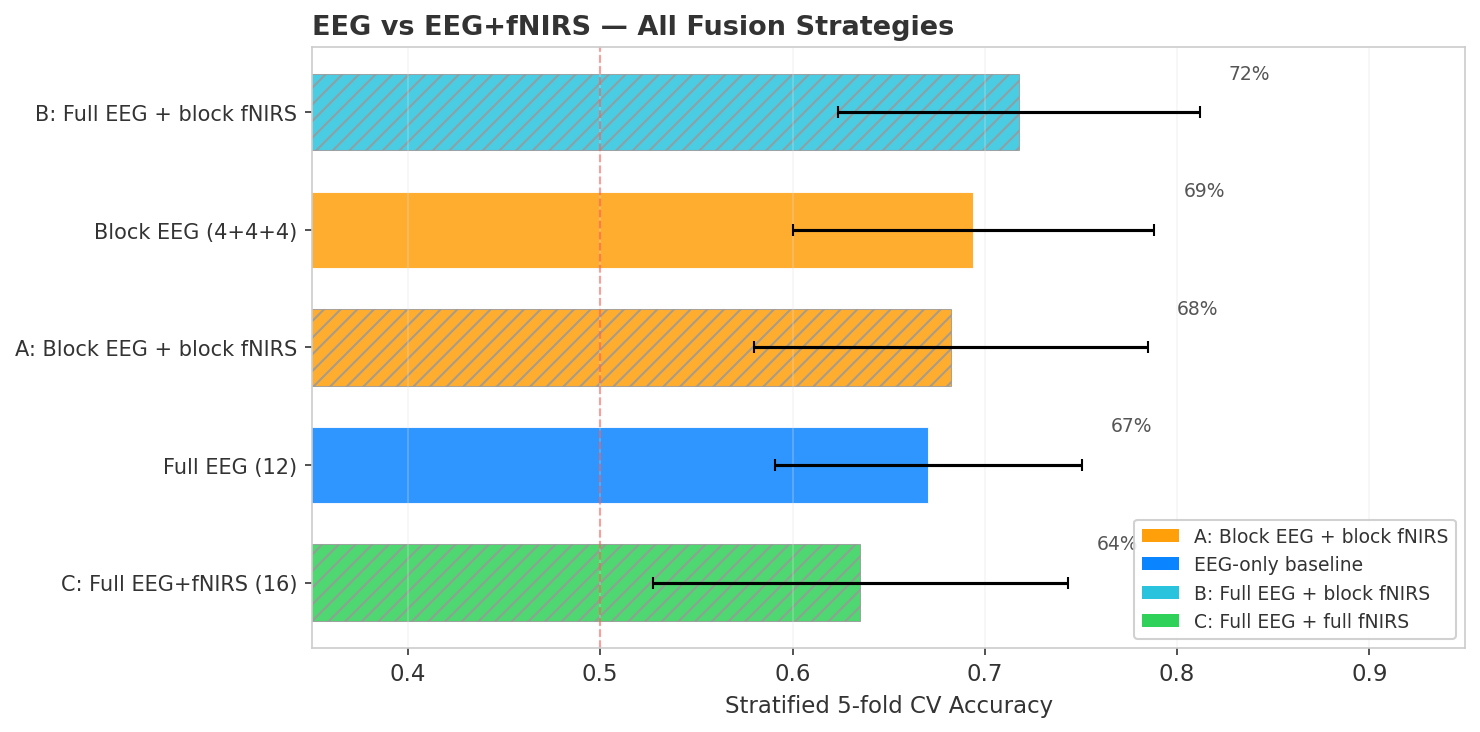
All five conditions ranked by stratified 5-fold cross-validation accuracy. Block EEG (4+4+4) achieves the highest accuracy at 68%. Color indicates fusion strategy; hatched bars include fNIRS. None of the fNIRS strategies surpass EEG-only baselines.
Here’s the punchline: In this setup and paradigm fNIRS adds nothing. Despite the promising multimodal setup, not a single fusion strategy beats plain EEG.
Block EEG (68%) wins overall, treating each frequency band as an independent covariance block works best
Strategy B (67%) is the best fNIRS approach, closely matching the full EEG baseline but not exceeding it. It uses RBF kernels for both EEG and fNIRS blocks
Strategy C (64%), the full cross-modal covariance, actually hurts. Cross-modal EEG×fNIRS correlations likely add noise, not signal
Strategy A (62%), all block-diagonal, is the worst fNIRS approach
Statistical testing
I used a permutation test (1,000 permutations) to assess whether the differences are significant. Under the null hypothesis, each fold’s accuracy difference is equally likely to be positive or negative, and we permute the signs to build a null distribution.
None of the three comparisons reach significance (all p > 0.5). The direction is consistently negative or zero.
Why doesn’t fNIRS help?
A few factors likely explain this:
Spatial resolution. The Muse S has only 2 long-distance fNIRS channels (left and right forehead). Research-grade fNIRS systems use 20-50+ channels with dense source-detector grids. With just 2 channels, there might not be enough spatial information to capture the distributed hemodynamic pattern of cognitive load.
EEG already captures the signal. Mental arithmetic can modulate alpha and theta power. On a 4-channel consumer EEG, this spectral signature might be already sufficient, the fNIRS doesn’t carry complementary information that EEG is missing.
Curse of dimensionality. Adding fNIRS channels increases the covariance matrix dimensionality without proportionally adding discriminative features. With only 80 trials, the larger matrices become harder to estimate reliably.
What I learned
More sensors are not necessarily better. The engineering intuition that more data means better classification breaks down when the additional modality doesn’t carry complementary information relative to its dimensionality cost.
Per-modality kernel tuning matters. An interesting finding: EEG alpha performed best with RBF kernels (ker:rbf+shr0.01), not standard covariance estimators. fNIRS also benefited from kernel methods. Using the same estimator for both would miss this. I wrote about the per-block kernel tuning approach in a previous pyriemann fNIRS example.
Trace normalization is essential for multimodal fusion. Without it, the modality with larger absolute values dominates the block-diagonal matrix.
Full cross-modal covariance hurts. Strategy C, computing one big covariance over all channels, performed worst. The cross-modal EEG×fNIRS correlations are noisy on a consumer device and add dimensionality without adding signal. Block-diagonal fusion (keeping modalities separate) is more robust.
The honest takeaway
On a consumer-grade Muse S Athena with 4 EEG channels and 2 fNIRS channels, adding fNIRS does not improve mental arithmetic vs rest classification in this small and personalized at-home experiment. This doesn’t mean multimodal sensing is useless, or that the Muse S fNIRS sensors are useless. This conclusion is limited to my specific setup, task, paradigm and maybe also to my neural dynamics. With more fNIRS channels, or tasks where EEG is weaker, the answer might be different. But for this combination of device, task, and data size, the 4-channel EEG seems to already capture all the discriminative strucutre. I still think its cool that companies like Muse start to think more in the multimodal sense for wearable. Ultimately I believe that each modality has certain advantages and in my opinion, an ideal BCI/HCI setup leverages all these different strengths to build the best possible application, without stressing too much about only using brain data.
]]>Tim Nähertim.naeher@tuebingen.mpg.deBack to VS Code in a blink2026-03-15T00:00:00+01:002026-03-15T00:00:00+01:00https://timnaher.github.io/posts/2026/03/brain-controlled-shortcutI keep losing my VS Code window. My desktop and browser is always a mess with way too many tabs open because I want to quickly look something up, and I am also guilty of having way too many desktops on my macbook open. Alt-tabbing through everything is annoying. What if I could just… blink my way back?
Good thing I have a Muse S Athena headband sitting on my desk.
Why blinks show up in EEG
EEG headbands like the Muse S Athena are designed to measure brain activity, but they also pick up a lot of other electrical signals. In clinical and basic neuroscience research, these are actually consideres artifacts and researchers, including myself, spend considerable effort removing them. One of the strongest artifact sources are the eyes.
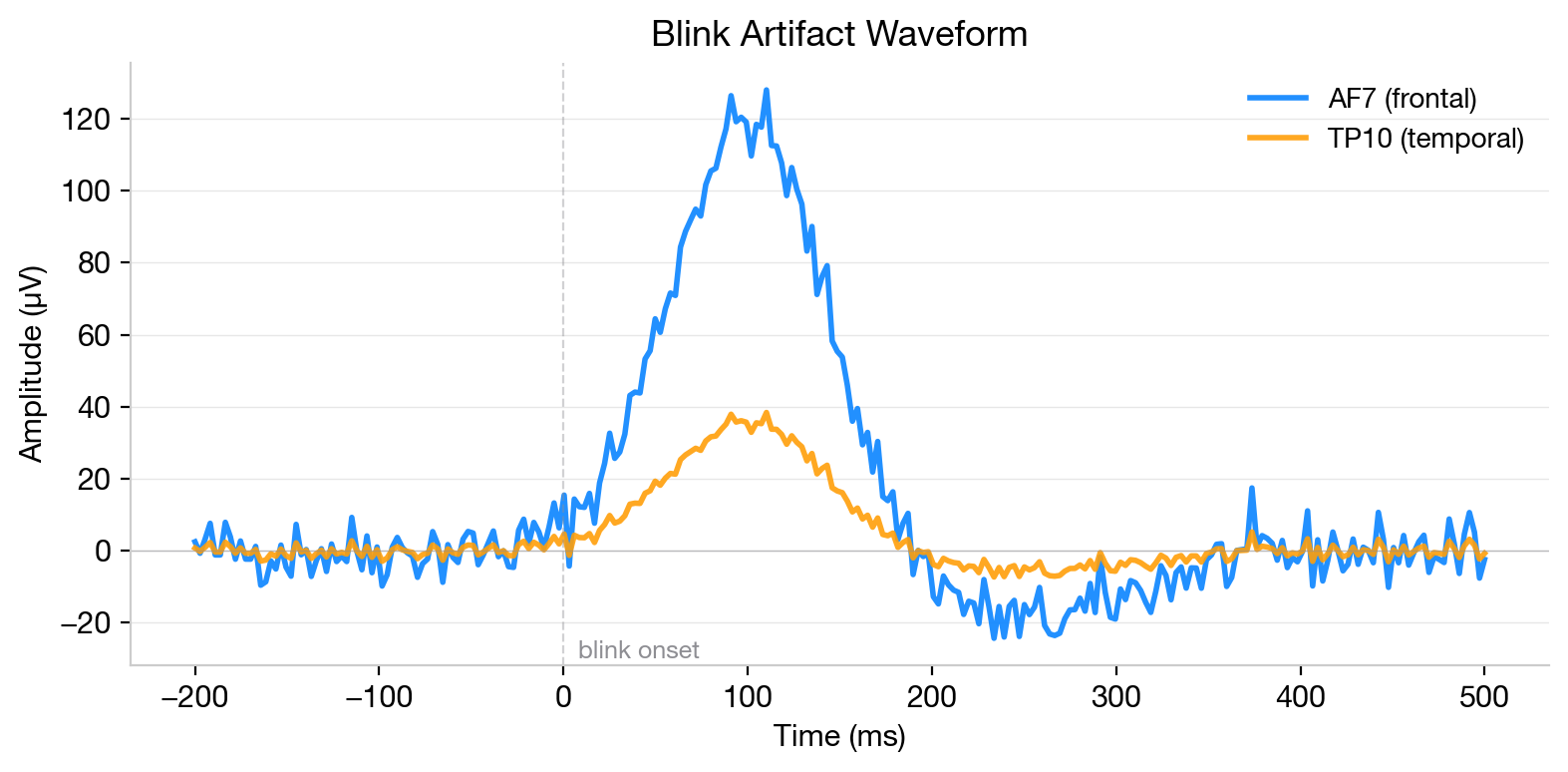
The eyes acts as electrical dipoles: the cornea is positively charged relative to the retina. Every time you blink, your eyelid sweeps across this dipole and briefly rotates it, producing a large voltage deflection that propagates across the scalp. Frontal electrodes (like AF7 and AF8 on the Muse) pick up the strongest signal, while temporal electrodes (TP9, TP10) see a weaker version.
Average blink artifact waveform recorded from the Muse S. The frontal electrode (AF7, blue) picks up a large ~125 uV deflection peaking around 100 ms after blink onset, while the temporal electrode (TP10, orange) shows a much weaker response (~35 uV).
This is normally a nuisance, but for a BCI, it’s a feature. In fact, many modern consumer BCI applications rely heavily on minimally processed EEG that is dominated by peripheral signals: blinks, jaw clenches, heartbeat artifacts, eye movements. From a pure engineering perspective, these signals are incredibly useful. Eye tracking paths alone can reconstruct visual scenes surprisingly well. The downside is that this leads to many claims of “decoding brain activity” when the system is really picking up a mix of peripheral signals. For this project, I’m being explicit about it: we’re detecting blinks, not reading minds. Blink artifacts are large (~100-200 uV, compared to ~10-50 uV for actual brain signals), consistent, and trivially voluntary. The trick is distinguishing intentional blink sequences from normal blinking.
The idea
Instead of detecting single blinks (which would trigger constantly), I defined a blink sequence: 4 rapid blinks with a distinct temporal sequence in about 1 second. This is distinctive enough that it basically never happens during normal activity, but easy enough to do on purpose. The end-to-end system needs to:
Stream EEG from the Muse S Athena in real time
Detect blink sequences with low latency
Trigger a macOS command (bring VS Code to front)
Connecting the Muse S Athena on macOS
This turned out to be the hardest part. The Muse S Athena (the latest hardware revision) uses a different BLE GATT profile than older Muses. It multiplexes all sensor data through fewer characteristics (273e0013 instead of the traditional 273e0003-0007). Neither BrainFlow nor muselsl support this.
I ended up using bleak (a Python BLE library) directly, building on the protocol reverse-engineered by the amused-py project.
The EEG data comes as 14-bit packed samples (not 12-bit like older Muses) at 256 Hz across 4 channels.
Recording training data
I wrote a quick prompter in PsychoPy (nostalgic, since I programmed my first psychophysics experiment in PsychoPy during my bachelor’s lol) that cues the target blink sequence at jittered intervals. I recorded 6 sessions (~460 seconds of data total, ~90 blink sequences). The EEG streams directly into CSV files alongside event markers.
The challenge is that the prompt only tells you approximately when the blinks happened. The exact onset and offset times of each blink within the sequence are unknown, which is why I needed a post hoc labeling strategy.
Labeling
Using the prompt timestamps as a rough guide, I search for blink peaks in a window after each cue. The labeling algorithm:
Bandpass filter the frontal channels (1-15 Hz) to isolate the blink waveform
Find peaks using the known inter-blink interval (IBI) distribution (~200-500ms)
Score candidate peak combinations by how well they match the expected rhythm
Mark the region from first blink onset to last blink offset as positive
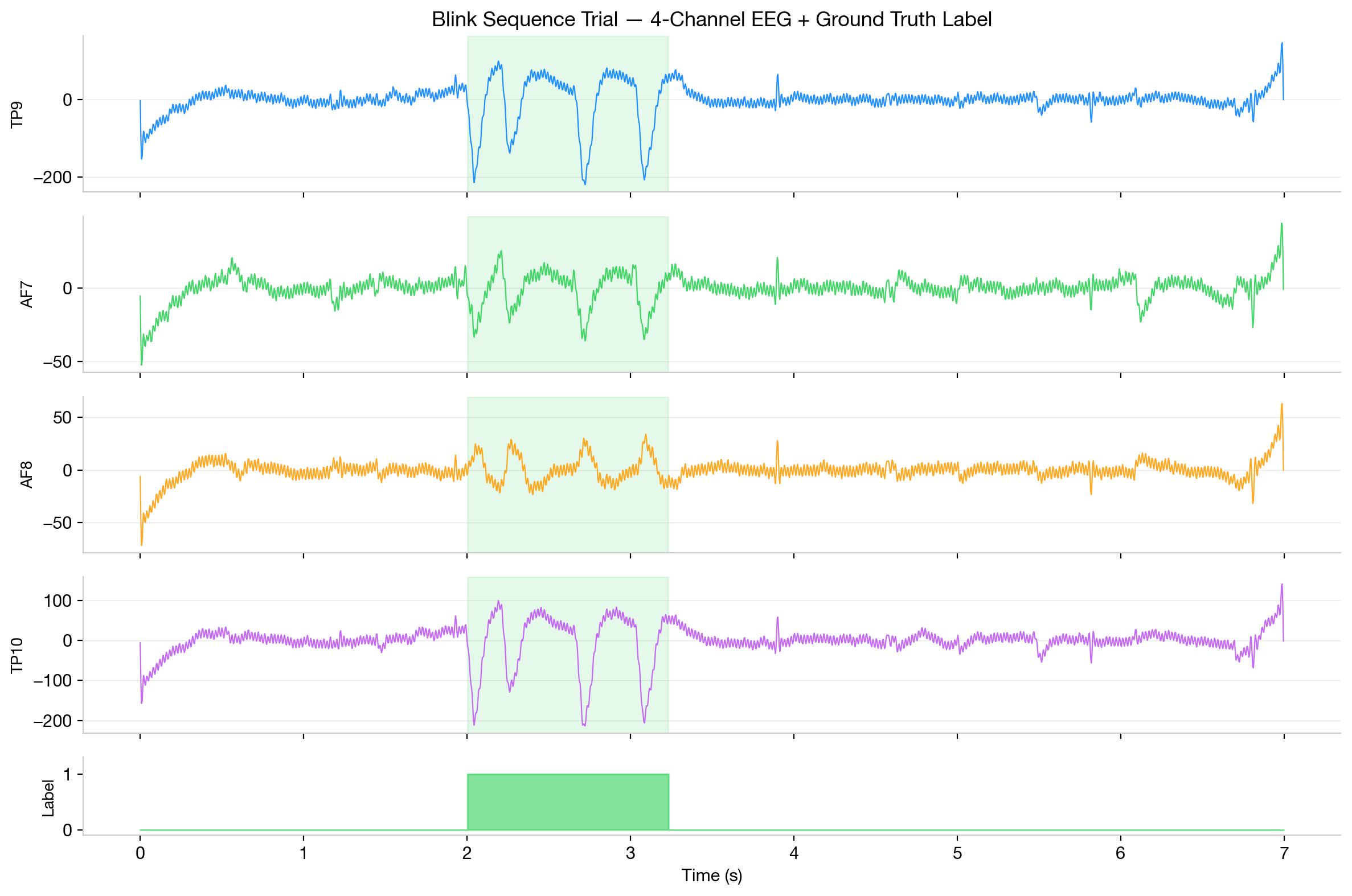
Example trial showing a 4-blink sequence across all four Muse channels (TP9, AF7, AF8, TP10). The green shaded region marks the ground truth label. The bottom row shows the binary label (1 during the blink sequence, 0 elsewhere).
The result is a binary label for every EEG sample: 1 during a blink sequence, 0 everywhere else. About 8-10% of the data is positive.
The model
I wanted something tiny and streaming-capable. The model sees a 5-second buffer of EEG and outputs predictions at 16 Hz (one prediction every 62.5ms):
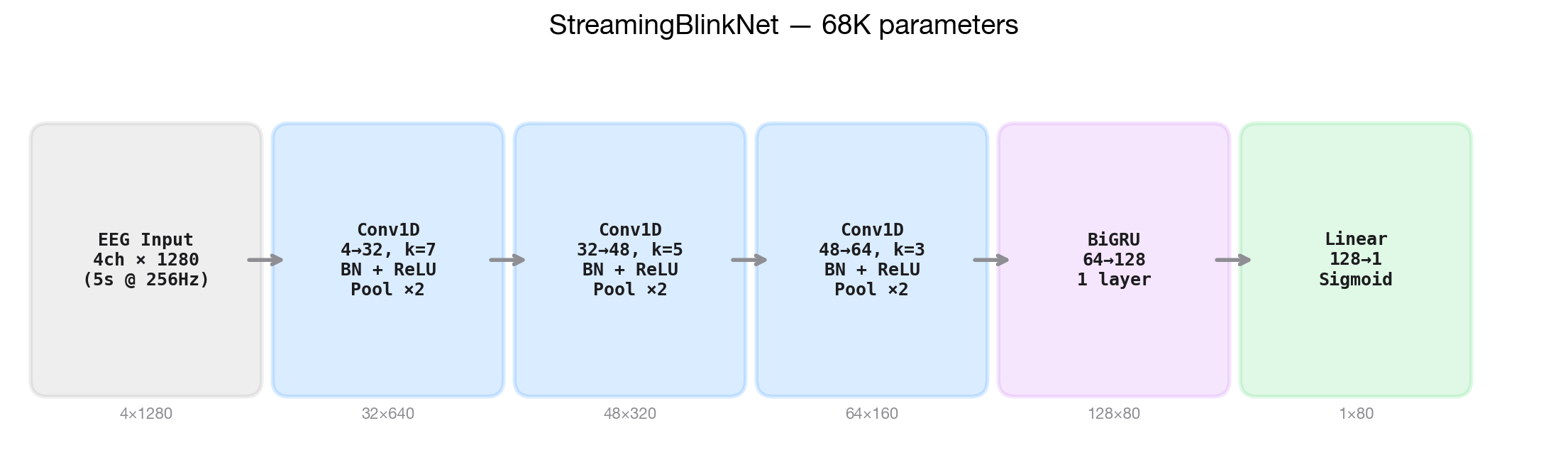
StreamingBlinkNet architecture (68K parameters). Three Conv1D blocks progressively downsample the 4-channel, 5-second EEG input (4x1280) to 64x160 features, followed by a bidirectional GRU and a linear head outputting per-timestep blink probabilities at 16 Hz (1x80).
StreamingBlinkNet, 68K parameters:
3x Conv1D blocks (kernel sizes 7, 5, 3) with batch norm, ReLU, and max pooling. This downsamples 256 Hz input to 16 Hz features while extracting local temporal patterns.
Bidirectional GRU (64 hidden units) captures longer temporal context across the full 5-second window. Bidirectional because we’re okay with ~2 second latency, so the model can look slightly into the “future” relative to the detection window.
Linear head maps to per-timestep blink probability.
The model is intentionally acausal with about 2 seconds of latency. This is a lot, and you could definitely build something much faster with a causal architecture or just a shorter look ahead. But for triggering a keyboard shortcut in this little example, 2 seconds is fine, and letting the model see the complete blink sequence before making a decision dramatically reduces false positives.
Training
With only 6 sessions of data, training takes about 30 seconds on an M4 Mac. I used a session-wise train/val split with one full session held out for validation.
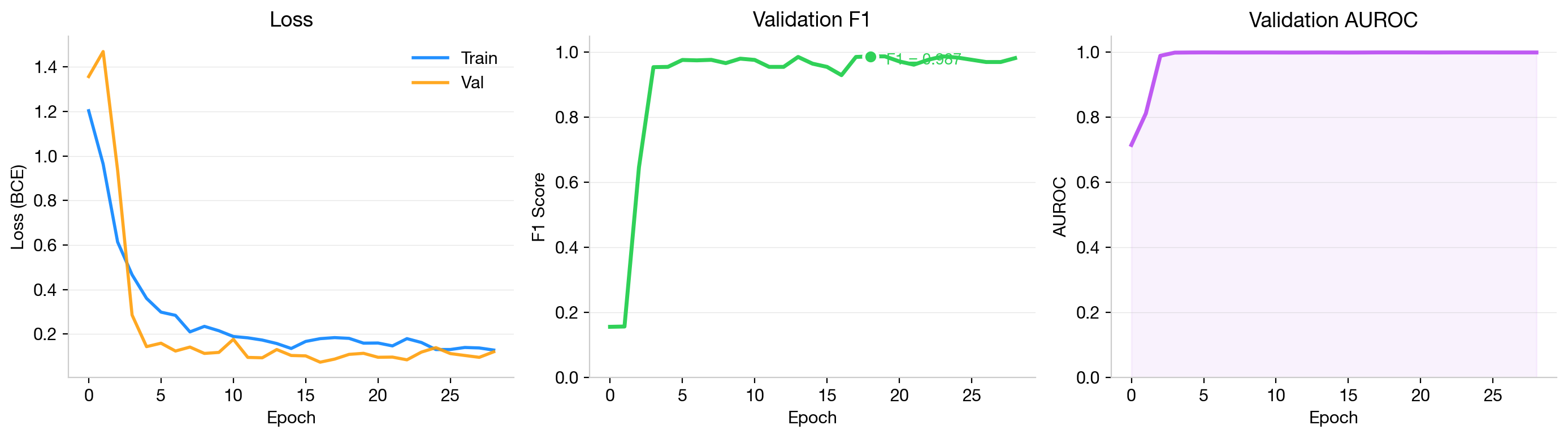
Training curves over 25 epochs. Left: BCE loss for train (blue) and validation (orange) sets. Center: validation F1 score reaching 0.986 (green dot marks best checkpoint). Right: validation AUROC saturating at 0.999.
The model converges fast and hits F1 = 0.986 on the held-out session with AUROC = 0.999. Early stopping kicks in around epoch 25. The class imbalance (~10% positive) is handled with a pos_weight of ~12x in the BCE loss. I used Adam with a learning rate of 1e-3 and cosine annealing, batch size 32, and early stopping with patience 15. For augmentations I applied Gaussian noise (2-5 uV), amplitude scaling (0.8-1.2x), channel dropout (10%), and time shifts of +/-50ms.
Does it actually work?
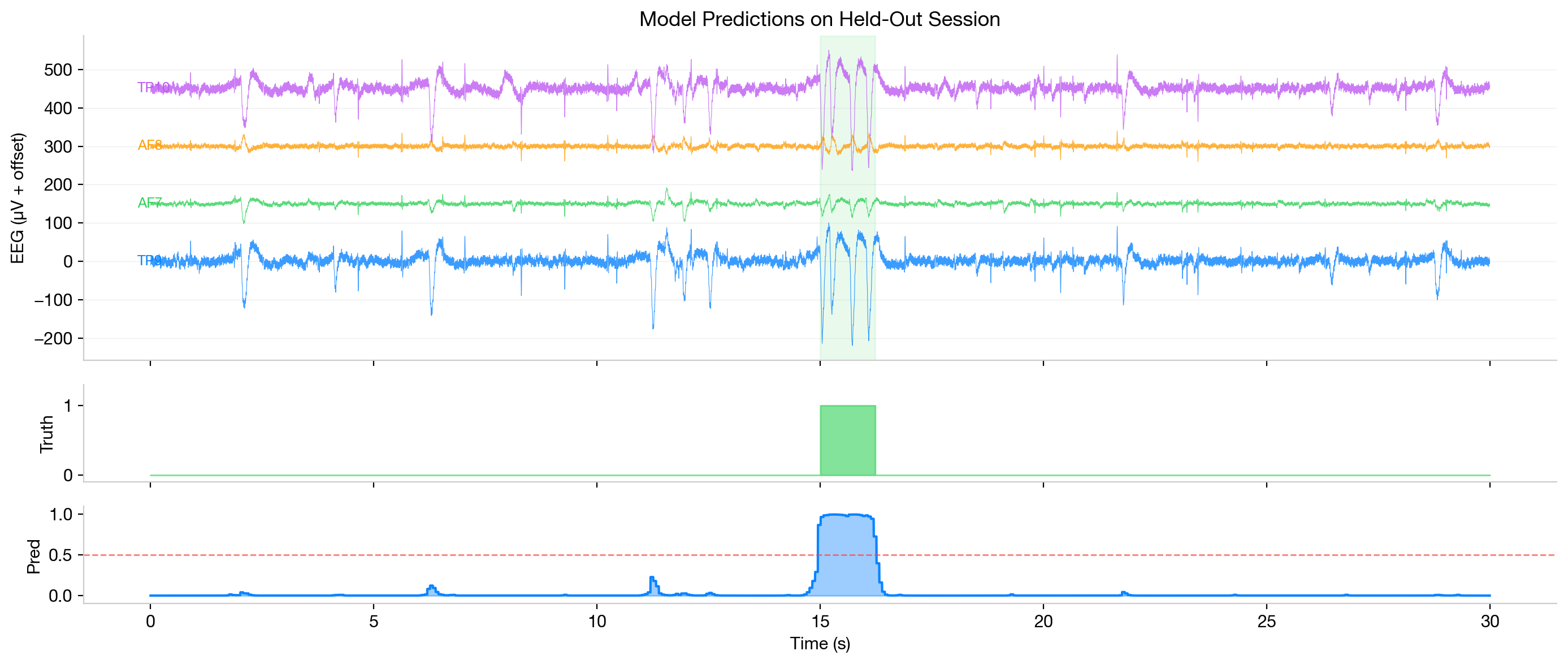
Here’s the model’s predictions on the held-out validation session, plotted against ground truth:
Model predictions on a 30-second segment from the held-out validation session. Top: raw 4-channel EEG with blink artifacts visible as large deflections. Middle: ground truth binary label. Bottom: model output probability (blue) with detection threshold (red dashed line). The model produces a sharp, well-localized peak with no false positives.
The model cleanly detects blink sequences with sharp probability peaks that closely match the ground truth labels. No false positives in this segment.
Real-time inference
The real-time system:
Connects to the Muse S via BLE
Fills a rolling 5-second buffer with incoming EEG
Runs inference every 80ms (~12 Hz)
Checks the detection window (1.5-3.0s from buffer end) for sustained high probability
On detection: plays a sound + runs osascript -e 'tell application "Visual Studio Code" to activate'
There’s a 3-second cooldown between detections to prevent double-triggers.
The whole thing runs as a tiny always-on-top window: just a status dot, a probability bar, and “Idle” / “Detected”.
The system in action. Four rapid blinks trigger VS Code to come to the foreground.
Takeaways
The entire project, from first BLE packet to working brain-controlled shortcut, took an afternoon. The model is 68K parameters and trains in 30 seconds. The inference runs comfortably at 12 Hz on CPU.
It’s worth noting that this is a personalized model, trained and tested on my own data. One of the hardest problems in deep learning for (neural/bio) signals is cross-participant generalization, which requires much more data and far more sophisticated modeling approaches and augmentation strategies. This is a really simple problem: the signal is strong, the task is binary, and the model only needs to work for one person. That’s why a tiny CNN + GRU with 15 minutes of training data gets you to 0.986 F1.
Still, it’s incredibly cool to me that you can build something like this in an afternoon. Connecting a consumer EEG headband to a real-time neural network that actually controls your computer is just so much fun to play around with!!