GazeAnnot: a desktop app for labeling eye movements and training U’n’Eye
Published:
I built a desktop application for labeling eye movement events and training the U’n’Eye deep learning model for automatic saccade detection. It’s called GazeAnnot, and it wraps the full workflow, from raw eye position data to trained model, into a single interactive tool.
Why this exists
Detecting saccades, microsaccades, and post-saccadic oscillations (PSO) in eye tracking data is a common task in vision research. The classical approach is velocity-threshold algorithms, but these require careful parameter tuning and struggle with noisy data or unusual saccade profiles. U’n’Eye (Bellet et al., 2019) showed that a deep neural network can match human-level saccade detection performance, but using it in practice means you need labeled training data, and labeling eye movement events by hand is tedious without a proper tool.
Existing labeling tools are either too general-purpose (not optimized for time series), require MATLAB, or don’t integrate with the training loop. I wanted something where you can load your data, label events interactively, train a model, evaluate it, and iterate, all without leaving the application.
The three views
GazeAnnot has three views, accessible from a sidebar: Label, Train, and Evaluate.
Label
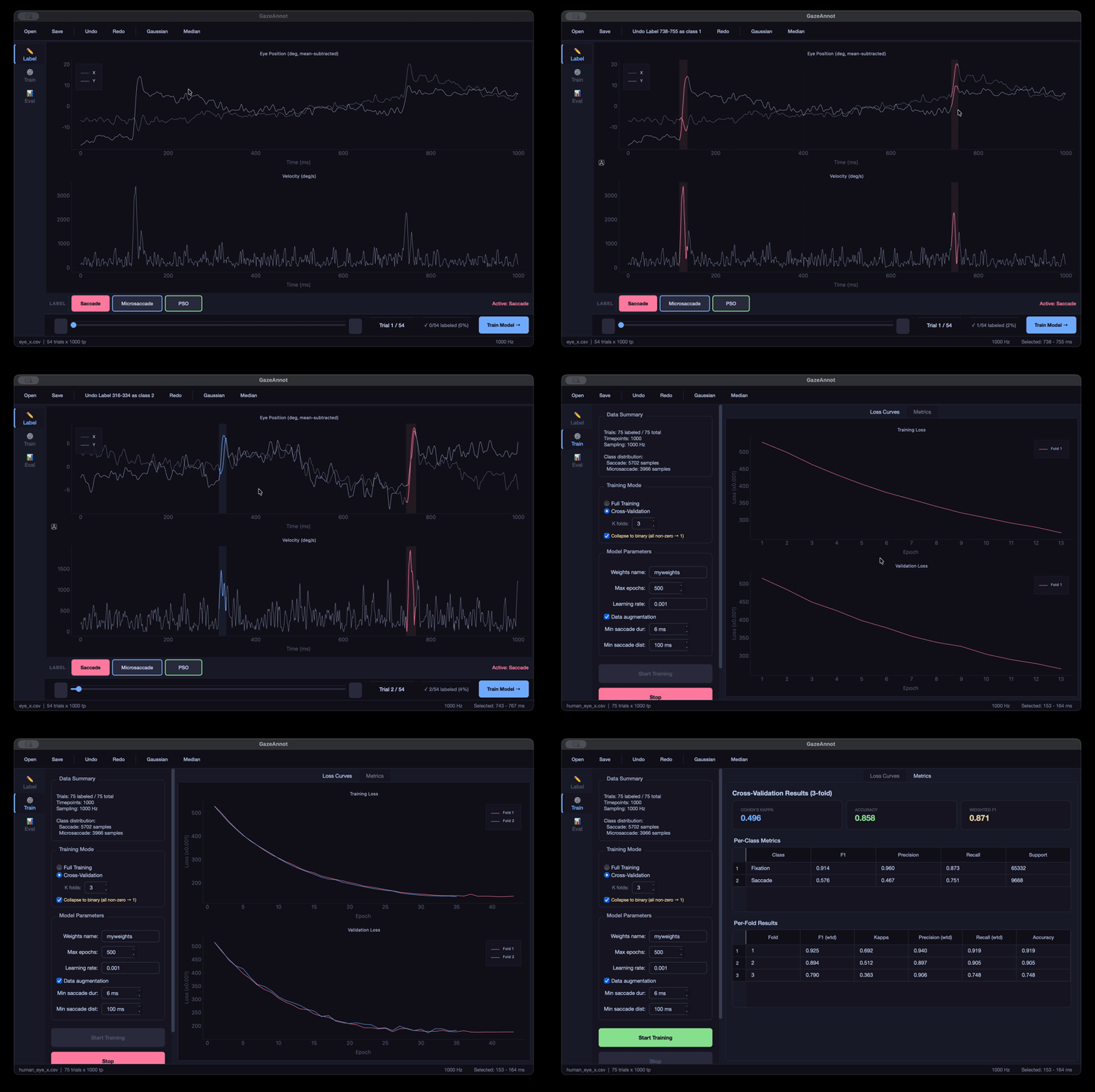
The labeling interface shows two synchronized plots: eye position (X and Y overlaid, mean-subtracted) on top, and Euclidean velocity in deg/s on the bottom. You label by dragging on the plot to select a time region and pressing Space to apply the active event class.
There are three default event classes, Saccade, Microsaccade, and PSO, each with its own color and keyboard shortcut (1, 2, 3). You can add custom classes with their own names, colors, and shortcuts through the class manager.
A few things that make labeling less painful:
- Undo/redo for all label edits (Ctrl+Z / Ctrl+Shift+Z)
- Right-click on a labeled segment to change its class
- Double-click to erase a segment
- Auto-save whenever you navigate between trials
- Gaussian smoothing (G) and median filter (M) toggles for noisy data
- Auto-detection of Y files and existing label files when you load data
Train
Once you have labeled data, you switch to the Train view. Two training modes are available:
- Full training: train on all labeled data and save the weights
- K-fold cross-validation (2-20 folds): get honest generalization metrics before committing to a final model
The training runs in a background thread with live loss curve visualization. In CV mode, each fold’s loss curve is overlaid so you can spot folds that behave differently. After training, you get per-class metrics (F1, precision, recall, support) and can optionally retrain on all data for the final deployment model.
You can configure learning rate, max epochs, data augmentation, and post-processing thresholds (minimum saccade duration, minimum distance between saccades). There’s also an option to collapse multi-class labels to binary (saccade vs. fixation) if your downstream task only needs that.
Evaluate
The evaluation view lets you run predictions with any trained weights file and inspect the results:
- Overall metrics: Cohen’s kappa, accuracy, weighted F1
- Per-class metrics table
- Onset/offset error histograms showing how well predicted event boundaries match ground truth
- A confusion browser that lets you navigate directly to trials where the model made errors
Data format
GazeAnnot reads eye position data from CSV, MATLAB v7.3, or NumPy files. The expected structure is rows = trials, columns = timepoints. When you load an X file, the app tries to auto-detect the corresponding Y file using common naming conventions (eye_x / eye_y, _x / _y, etc.). Labels are stored as integers per timepoint (0 = fixation, 1 = saccade, 2 = microsaccade, …) and auto-saved as CSV next to your data files.
Technical details
The app is built with PyQt6 for the GUI and pyqtgraph for the interactive plots. The U’n’Eye model runs on PyTorch. The dark theme uses Catppuccin colors. The whole thing is pure Python, no compilation step, no Electron, no web stack.
All label edits go through a QUndoStack, so undo/redo is robust even for complex sequences of edits. Training workers run in separate QThreads with per-epoch callbacks, so the UI stays responsive during training.
Get it
The code is on GitHub: timnaher/gazeannot
Install is straightforward:
conda create -n gazeannot python=3.11 -y
conda activate gazeannot
pip install PyQt6 pyqtgraph numpy scipy pandas mat73 torch scikit-learn scikit-image matplotlib
git clone https://github.com/timnaher/gazeannot.git
cd gazeannot
python main.py
A sample dataset (54 trials at 1000 Hz) is included in the data/ directory so you can try it out immediately.